

You can control exactly how ChatGPT responds — not just what it says — by specifying tone, format, and length directly in your prompt.
Controlling Tone (Formal, Casual, Persuasive)
This part shows how naming a tone changes the entire feel of the response.
Tone is the style and attitude of the writing. Naming a tone in your prompt — formal, casual, persuasive, friendly — shifts word choice and sentence structure to match.
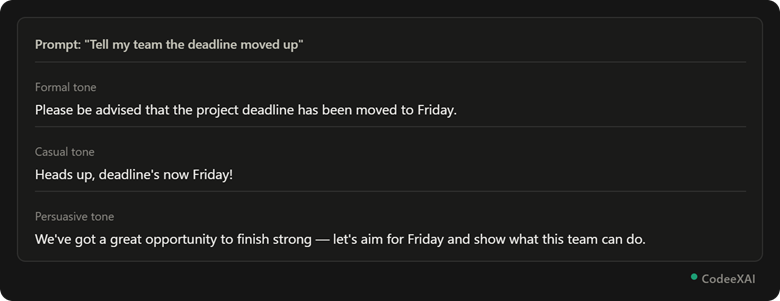
This picture shows the exact same message rewritten three ways, just by changing one word — the tone — in the prompt.
Requesting Specific Formats (List, Table, Essay)
This part shows how naming a format shapes the structure of the response, not just the content.
Format is the structure of the response — a list, table, essay, or bullet points. Naming it directly avoids getting the wrong structure back.
Comparison Table: Format Requests
This table shows how the same request produces a different structure depending on the format named in the prompt.
| Format Requested | What You Get |
| "as a list" | Numbered or bulleted points |
| "as a table" | Rows and columns |
| "as an essay" | Full paragraphs, no bullets |
| "in one sentence" | A single condensed line |
Controlling Response Length
This part shows how to directly control how short or long an answer comes back.
You can set length explicitly — by word count, sentence count, or a relative term like "brief" or "detailed" — instead of getting ChatGPT's default length.
Example prompts for length:
- "In under 50 words"
- "In exactly 3 sentences"
- "Give a detailed, in-depth explanation"
- "Keep it to one paragraph"
Combining Tone + Format Instructions
This part shows how tone and format work together in a single prompt for full control over the output.
Combining tone and format in one prompt gives you precise control over both how it sounds and how it's structured.
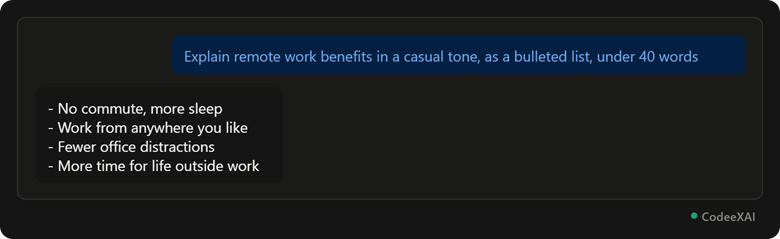
This picture shows a single prompt controlling tone (casual), format (bulleted list), and length (under 40 words) all at once — and ChatGPT following all three instructions exactly.
Why it works: Stacking tone, format, and length instructions in one prompt leaves no room for ChatGPT to guess — each instruction targets a different part of the output, and together they produce a precisely shaped response.
Conclusion
Naming a tone shapes how the response sounds, naming a format shapes how it's structured, and naming a length controls how much you get back. Combining all three in a single prompt gives you the most precise control over ChatGPT's output.