

ChatGPT can search the web directly and answer with current information, complete with source links — no separate browser tab needed.
Enabling Web Browsing
This part shows exactly where the search option lives and how to turn it on.
Web search is available to everyone at chatgpt.com, no sign-up required, and works with a natural language interface for real-time information on news, sports, and more. Search appears via a globe icon, and it can be triggered manually by clicking that icon, or automatically when your question needs current information.

This picture shows exactly where the search (globe) icon sits in the message bar — clicking it turns web browsing on for that message.
Example: Enabling Search Steps
This example lists the exact steps to turn on browsing.
- Open chatgpt.com — no login required for basic search.
- Look for the globe icon labeled "Search" in the message bar.
- Click it to activate search mode, or just ask a question that clearly needs current info — ChatGPT can also trigger search automatically.
- Type your question and send — the answer will include links to sources.
Example Real-Time Search Prompts
This part shows what a real search-triggered question and answer look like.
Once search is on, ChatGPT pulls current information from the web instead of relying only on its training data.
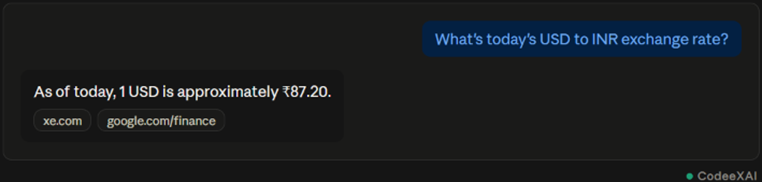
This picture shows a live-data question answered with a current figure and small source tags — exactly what web browsing looks like in action.
More example prompts that trigger search:
- "What's the latest news on [topic]?"
- "Who won [event] yesterday?"
- "What's the current price of [stock/product]?"
- "Summarize today's top tech headlines"
Limitations of Web Browsing
This part covers the real constraints you should know before trusting every search result fully.
Web browsing makes ChatGPT far more current, but it isn't perfect, and a few limitations matter.
- Accuracy isn't guaranteed: ChatGPT summarizes what it finds, but source quality varies — always check the cited link for anything important.
- Not every source is equally reliable: Search results can include lower-quality or biased pages alongside trustworthy ones, and ChatGPT doesn't always distinguish perfectly between them.
- Citations weren't always available: Earlier versions of search didn't provide source citations at all — current versions do, but always verify the link is real and relevant.
- Requires a live connection: Without internet access, browsing simply can't run, and ChatGPT falls back to its trained knowledge only.
- Comparison Table: With Search vs Without Search
This table shows the practical difference between asking a question with browsing on versus off.
| Situation | Without Search | With Search |
| "Who won the match yesterday?" | Can't answer accurately | Pulls current result with source |
| "Explain photosynthesis" | Answers fine from training data | No search needed |
| "Latest iPhone price" | May give outdated pricing | Pulls current listed price |
Conclusion
Web browsing turns ChatGPT into a real-time research tool — click the globe icon or just ask a current-events question, and it pulls live information with source links attached. It's genuinely useful for prices, news, and recent events, but source quality still varies, so verifying anything important through the cited link remains a good habit.