

Ai hallucination happens when an AI system, like a chatbot, confidently gives an answer that sounds correct but is actually false or made up. It is one of the biggest problems with today's AI language models. In this guide, you will learn what hallucination means in LLMs, why it happens, and how it can be reduced.
What is AI Hallucination?
This part explains the basic meaning of hallucination in AI, in easy words.
Ai hallucination means a large language model, or LLM, generates text that is false, made up, or not based on real facts, but says it with full confidence. The AI is not lying on purpose — it does not actually know the difference between true and false, it just predicts words that sound likely.
Example: If you ask an AI for a book written by a famous author, it may confidently give you a book title that does not exist, along with a fake publish date, because it sounded like a normal answer pattern.
Code Example:
def ai_answer(question):
    # A made-up, unverified fact
    return "The book was published in 1987 by John Carter"

print(ai_answer("When was this book published?"))
Explanation: This code returns an answer with no real fact-checking behind it, just like an LLM can generate a confident-sounding sentence without knowing if it is actually true.
Why Does AI Hallucination Happen?
This part explains the main reasons why LLMs produce false information.
Ai hallucination happens mainly because of how LLMs are built. An LLM does not store facts like a database — it learns patterns of language and predicts the next most likely word, one word at a time.
Common reasons hallucination happens:
- No real understanding: The AI predicts likely word patterns, it does not truly "know" facts.
- Gaps in training data: If the AI was never trained on certain information, it may guess instead of saying "I don't know."
- Outdated knowledge: The AI's training data has a cutoff date, so it may not know about newer events.
- Ambiguous questions: Unclear or tricky questions can push the AI toward a confident-sounding guess.
- Pressure to always answer: Many models are trained to always give a full response, instead of saying "I'm not sure."
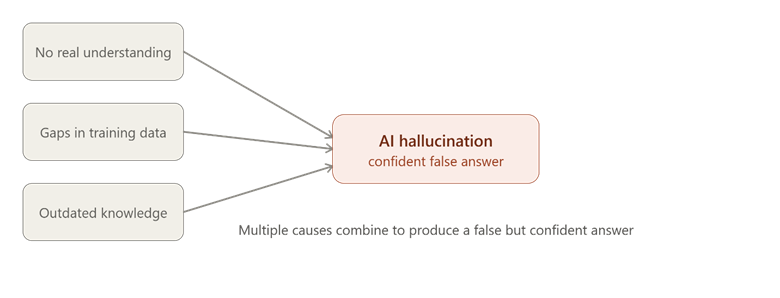
This picture shows how different causes combine to make an AI produce a false but confident answer.
Code Example:
known_facts = {"capital of France": "Paris"}

def answer(question):
    if question in known_facts:
        return known_facts[question]
    else:
        return "Berlin"  # made-up guess, not a real fact

print(answer("capital of Australia"))  # Wrong, made-up answer
Explanation: This code shows what happens when a question is outside the known facts — instead of saying "I don't know," it returns a made-up guess, just like an LLM can do when it lacks real information.
How to Reduce AI Hallucination
This part explains the main techniques used to make AI answers more accurate and trustworthy.
Hallucination cannot be removed completely, but it can be reduced using a few proven techniques.
1. RAG (Retrieval-Augmented Generation)
RAG means the AI first searches a trusted source of real information, like a document or database, before writing its answer. Instead of guessing from memory, it builds the answer using facts it just retrieved.
Example: A support chatbot using RAG searches the company's help documents first, then answers your question using that real content, instead of guessing.
documents = {"return policy": "Items can be returned within 30 days"}

def rag_answer(question):
    if "return" in question:
        fact = documents["return policy"]
        return "Based on our policy: " + fact
    return "No information found"

print(rag_answer("What is the return policy?"))
Explanation: This code first checks a trusted source (documents) before answering, instead of guessing — this is the core idea behind RAG.
2. Grounding
Grounding means connecting the AI's answer directly to real, verified data, like live facts, sensor data, or a trusted database, so the answer stays tied to reality instead of just predicted text.
Example: A weather chatbot is grounded when it pulls the real temperature from a live weather API, instead of guessing what the weather "usually" is.
3. Fact-Checking
Fact-checking means adding an extra step where the AI's answer is checked against a trusted source, either automatically or by a human, before it is shown to the user.
Example: A news-writing AI tool can automatically compare its draft against verified news sources, and flag any sentence that does not match a real source.
trusted_fact = "Water boils at 100°C at sea level"
ai_answer = "Water boils at 120°C at sea level"

if ai_answer != trusted_fact:
    print("Warning: possible hallucination detected")
else:
    print("Answer verified as correct")
Explanation: This code compares the AI's answer to a known correct fact, and flags a warning if they do not match — this is the basic idea behind automatic fact-checking.
Comparison Table: Ways to Reduce AI Hallucination
| Method | What It Does | Example |
| RAG | Searches trusted data before answering | Chatbot reading company documents |
| Grounding | Connects answers to real, live data | Weather bot using live weather API |
| Fact-Checking | Verifies the answer after it is generated | Comparing AI text to trusted sources |
Conclusion
Ai hallucination happens because LLMs predict likely word patterns instead of truly knowing facts, which can lead to confident but false answers. Techniques like RAG, grounding, and fact-checking help reduce this problem by connecting AI answers to real, verified data instead of pure guesswork. The key takeaway is that trustworthy AI needs these extra safety steps — without them, even a smart-sounding answer can be completely wrong.