

AI agent tool use is when an AI agent calls outside tools, like a weather API or a calculator, instead of only using its own built-in knowledge. This lets the AI get fresh, correct information or perform real actions. In this guide, you will learn what function calling means, how modern LLM agents call external tools, and see a simple example flow.
What is AI Agent Tool Use?
This part explains the basic meaning of tool use in AI agents, in easy words.
AI agent tool use means an AI agent can reach outside of its own memory and use external programs, called tools, to finish a task. A large language model, or LLM, only knows what it was trained on. But with tool use, it can check today's weather, do exact math, or search the web — things it cannot do alone.
Example: If you ask an AI agent "What is the weather in Delhi right now?", the AI cannot know this on its own. So it calls a weather tool, gets the real answer, and then replies to you using that fresh data.
What is Function Calling?
This part explains the exact method AI agents use to talk to outside tools.
Function calling is the process where an LLM decides which tool to use, picks the correct inputs, and asks the system to run that tool for it. The AI does not run the tool itself — it just says "please run this function with these details," and the system runs it and sends the result back.
Function calling usually needs three things:
- Function name — which tool to call, like get_weather
- Parameters — the inputs the tool needs, like a city name
- Result — the answer the tool sends back to the AI
Code Example:
def get_weather(city):
    weather_data = {"Delhi": "32°C, Sunny", "London": "18°C, Rainy"}
    return weather_data.get(city, "City not found")

# The AI decides to call this function with "Delhi"
result = get_weather("Delhi")
print(result)  # Output: 32°C, Sunny
Explanation: This code shows a simple get_weather function. In real AI agent tool use, the AI does not write this code — it just picks the function name and the city, and the system runs it and returns the result.
How Modern LLM Agents Call External Tools
This part explains the full step-by-step process an LLM agent follows when it uses a tool.
Modern LLM agents follow a repeating cycle to handle ai agent tool use. This cycle has five main steps:
- The user asks a question.
- The LLM checks if it needs a tool to answer correctly.
- The LLM picks a tool and generates the correct inputs for it.
- The tool runs outside the LLM and sends back a result.
- The LLM reads the result and writes the final answer for the user.
This is different from a normal chatbot reply, because the AI is not just guessing — it is using real, checked data from a tool.
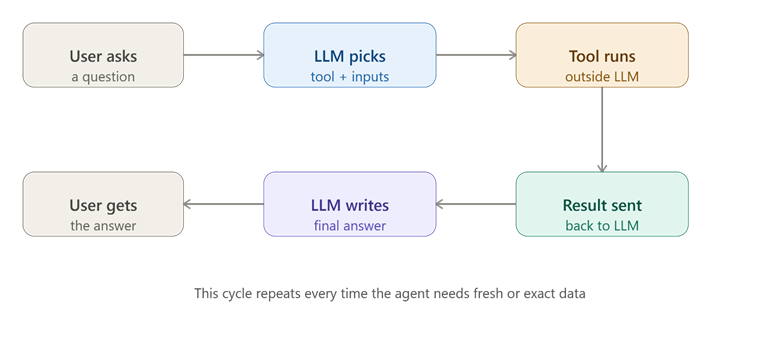
This picture shows the full cycle of how an LLM agent uses a tool to answer a question.
Code Example:
def call_tool(tool_name, city):
    if tool_name == "get_weather":
        weather_data = {"Delhi": "32°C, Sunny"}
        return weather_data.get(city, "Not found")

# Step 2 & 3: LLM decides tool name and input
tool_name = "get_weather"
city = "Delhi"

# Step 4: tool runs and returns result
result = call_tool(tool_name, city)

# Step 5: LLM uses result to answer
print("Final answer: The weather in", city, "is", result)
Explanation: This code shows the whole cycle in a small way — the AI picks a tool name and a city, the call_tool function runs and returns data, and the last line builds the final answer using that data.
Simple Example Flow of AI Agent Tool Use
This part walks through one full real-life example of ai agent tool use, from question to answer.
Imagine a user asks an AI agent: "What is 245 multiplied by 8?" Large language models are not always accurate at big math, so a smart agent uses a calculator tool instead of guessing.
Example flow:
- User asks: "What is 245 × 8?"
- LLM decides: this needs a calculator tool, not a guess.
- LLM calls the function calculate(245, "*", 8).
- The tool runs the real math and returns 1960.
- LLM replies: "245 multiplied by 8 is 1960."
Code Example:
def calculate(a, operator, b):
    if operator == "*":
        return a * b
    elif operator == "+":
        return a + b

# LLM calls the function with the correct numbers
answer = calculate(245, "*", 8)
print("245 x 8 =", answer)  # Output: 245 x 8 = 1960
Explanation: This code shows a small calculator function. The AI never does the multiplication itself — it just tells this function what numbers and operator to use, and trusts the real, exact result it gets back.
Comparison Table: Normal LLM Reply vs Tool Use Reply
| Situation | Normal LLM Reply | AI Agent Tool Use Reply |
|---|---|---|
| Asking today's weather | Cannot know, may guess wrong | Calls a weather tool, gets real data |
| Big math calculation | May make small errors | Calls a calculator tool, gets exact answer |
| Latest news | Cannot know recent events | Calls a search tool, gets fresh results |
| Booking a task | Cannot take real action | Calls an API to actually book or send |
Conclusion
AI agent tool use lets an AI agent go beyond its own memory by calling outside tools through function calling, using real data instead of guesses. The simple example flow shows how an agent picks a tool, sends the correct inputs, and builds its final answer using the real result. The key takeaway is that tool use turns an AI from a text generator into an agent that can check facts and take real actions.