

Python type conversion means changing a value from one data type to another, like turning text into a number, or a number into text. Python offers built-in tools to do this easily. In this guide, you will learn about int(), float(), str(), the difference between implicit and explicit conversion, and common errors beginners face.
What is Type Conversion in Python?
This part explains the basic meaning of type conversion, in easy words.
Type conversion, also called type casting, means changing a value from one data type to another, such as changing text (str) into a whole number (int). Python needs values to be the correct type before it can do certain operations, like math on numbers.
Example: If a user types their age into a form, it comes in as text, like "25". Before you can do math with it, you need to convert it into a number using python type conversion.
age_text = "25"
age_number = int(age_text)
print(age_number + 5)  # Output: 30
Explanation: This code takes the text "25", converts it into a number using int(), and then adds 5 to it. Without conversion, adding a number to text would cause an error.
Using int(), float(), and str()
This part explains the three most common built-in functions used for type conversion in Python.
Python gives you simple built-in functions to convert between the most common data types.
- int(): Converts a value into a whole number.
- float(): Converts a value into a decimal number.
- str(): Converts a value into text.
num_text = "42"
price_text = "9.99"
count = 10

whole_number = int(num_text)
decimal_number = float(price_text)
text_version = str(count)

print(whole_number, decimal_number, text_version)
# Output: 42 9.99 10
print(type(whole_number), type(decimal_number), type(text_version))
Explanation: This code shows all three functions in action — int() turns text into a whole number, float() turns text into a decimal, and str() turns a number into text. The type() function then confirms each new data type.
Implicit vs Explicit Conversion
This part explains the two ways type conversion can happen in Python.
Implicit conversion happens automatically, without you writing any code to do it — Python decides on its own. Explicit conversion happens when you manually write code, using functions like int() or str(), to convert a value yourself.
Example of implicit conversion:
num = 5        # int
pi = 2.5       # float
result = num + pi
print(result)       # Output: 7.5
print(type(result))  # Output: <class 'float'>
Explanation: Python automatically converts the whole number 5 into a decimal behind the scenes, so it can safely add it to 2.5. You did not write any conversion code — Python did it on its own.
Example of explicit conversion:
age = "25"
age_number = int(age)   # you manually convert it
print(age_number + 1)   # Output: 26
Explanation: Here, you manually call int() to convert the text into a number yourself. Python would not do this one automatically, because text and numbers cannot be mixed without your instruction.
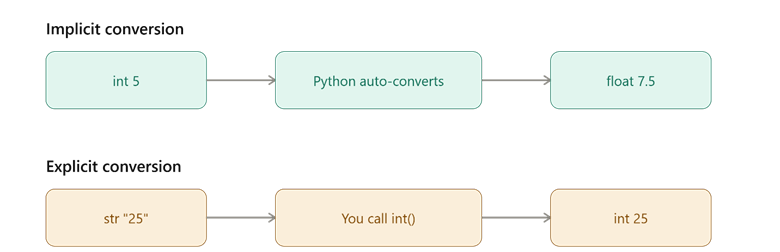
This picture shows the difference between Python converting a type automatically and a programmer converting it manually.
Comparison Table: Implicit vs Explicit Conversion
| Type | Who Does It | Example | Risk of Error |
| Implicit | Python does it automatically | 5 + 2.5 becomes 7.5 | Very low |
| Explicit | Programmer writes it manually | int("25") | Higher, if input is invalid |
Common Errors in Type Conversion
This part explains the mistakes beginners often run into when converting data types.
Type conversion looks simple, but a few common mistakes can cause errors in your code.
- Converting invalid text to a number — Trying to convert text like "hello" into an int() causes a ValueError, because it is not a real number.
- Forgetting to convert before math — Adding a number directly to text, like 5 + "5", causes a TypeError, because Python cannot mix these types without conversion.
- Losing decimal data — Converting a decimal number into int() removes everything after the decimal point, instead of rounding it.
try:
    value = int("hello")
except ValueError:
    print("Error: cannot convert this text to a number")

print(int(9.8))  # Output: 9, not 10 - decimal part is dropped
Explanation: This code shows two common mistakes — trying to convert non-number text causes a ValueError, and converting a decimal number to int() simply cuts off the decimal part instead of rounding it.
Conclusion
Python type conversion lets you change data between types like int, float, and str, using either implicit conversion, which Python does automatically, or explicit conversion, which you control yourself with functions. Understanding common errors, like converting invalid text or losing decimal values, helps you write safer code. The key takeaway is that converting types correctly, at the right time, avoids many of the most common bugs beginners run into in Python.