

Python if else statements let a program make decisions and run different code depending on whether a condition is true or false. This is one of the most used features in any Python program. In this guide, you will learn if, elif, else, nested if statements, the ternary operator, and the walrus operator.
What is an If-Else Statement in Python?
An if-else statement checks a condition, and runs one block of code if it is true, or a different block if it is false. This lets your program react differently depending on the situation, instead of always running the same code.
Example: Basic If-Else Check
This example shows the simplest possible use of python if else, checking a single condition and picking one of two outcomes. It sets up the core pattern used in almost every decision in Python.
age = 20

if age >= 18:
    print("You can vote")
else:
    print("You cannot vote yet")
Explanation:
Python checks if age >= 18 is true. Since age is 20, the condition is true, so the code inside if runs and prints the voting message. The else block is skipped because it only runs when the condition is false.
Using elif for Multiple Conditions
elif, short for "else if," lets you check more conditions after the first if fails. This is used when you have more than two possible outcomes, instead of just true or false.
Example: Grading a Test Score
This example checks a score against several grade ranges, showing how elif lets a program pick between more than two outcomes. It builds directly on the basic python if else pattern shown above.
score = 72

if score >= 90:
    grade = "A"
elif score >= 75:
    grade = "B"
elif score >= 60:
    grade = "C"
else:
    grade = "F"

print("Grade:", grade)
Explanation:
Python checks each condition from top to bottom and stops at the first one that is true. Since score is 72, it fails the first two checks but passes score >= 60, so grade becomes "C", and the rest of the conditions are skipped.
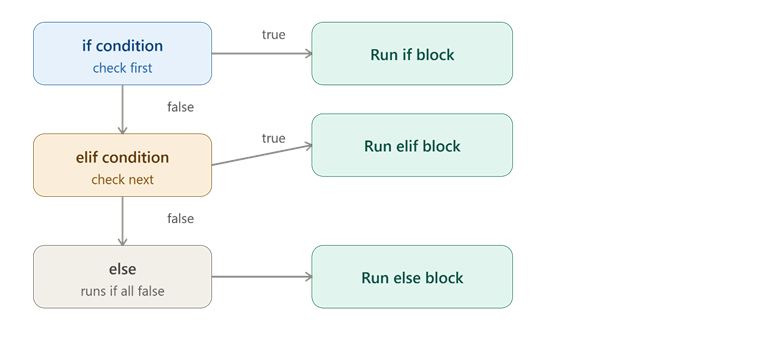
This picture shows how Python checks each condition in order, only running one matching block.
Nested If Statements
A nested if is an if statement placed inside another if statement. This lets you check a second condition, but only after the first condition has already been confirmed true.
Example: Checking Login and Admin Access
This example checks if a user is logged in first, and only then checks if they are an admin. It shows how nested if statements let you build conditions that depend on an earlier condition already being true.
logged_in = True
is_admin = True

if logged_in:
    if is_admin:
        print("Welcome, Admin")
    else:
        print("Welcome, User")
else:
    print("Please log in first")
Explanation:
Python first checks logged_in. Only if that is true does it move inside and check is_admin. If logged_in were False, the inner check would never even run, because the outer condition already failed.
Ternary Operator (Conditional Expression)
The ternary operator is a short, one-line way to write a simple if-else statement. It is used when you just want to assign one of two values based on a condition, without writing a full multi-line block.
Example: Shortening an Eligibility Check
This example rewrites a basic python if else check into a single line using the ternary operator. It shows how the same logic can be written shorter when the decision is simple.
age = 20
status = "Adult" if age >= 18 else "Minor"
print(status)
Explanation:
This single line does the same job as a full if-else block. Python checks age >= 18 first; if true, status becomes "Adult", otherwise it becomes "Minor".
Comparison Table: Full If-Else vs Ternary Operator
| Style | Example | Best For |
| Full if-else | 4 lines with if and else | Multiple lines of logic per condition |
| Ternary operator | 1 line with if...else | Simple, single-value decisions |
Walrus Operator (:=)
The walrus operator, written as :=, lets you assign a value to a variable and use that value in the same line, often inside an if condition. It was added to Python to avoid repeating the same calculation twice.
Example: Avoiding Repeated Calculation
This example compares checking a value the normal way versus using the walrus operator to assign and check it in one step. It shows how the walrus operator can shorten code that would otherwise calculate the same thing twice.
# Without walrus operator
price = 550
if price > 500:
    print("Expensive item, price is", price)

# With walrus operator
if (discount_price := 550 * 0.9) < 500:
    print("Now affordable at", discount_price)
else:
    print("Still expensive at", discount_price)
Explanation:
The walrus operator := calculates 550 * 0.9 and stores it in discount_price, while also using that same value immediately in the condition. Without it, you would need one line to calculate discount_price and a separate line to check it.
Conclusion
Python if else statements form the core decision-making tool in Python, starting with basic if-else, expanding with elif for multiple outcomes, and going deeper with nested if statements for conditions inside conditions. The ternary operator shortens simple decisions into one line, while the walrus operator lets you assign and check a value at the same time. The key takeaway is that choosing the right form — full if-else, nested, ternary, or walrus — keeps your code both correct and easy to read.