

Python for loop and python while loop are used to repeat a block of code multiple times, instead of writing the same line again and again. Python offers two main types of loops, each suited for different situations. In this guide, you will learn for loops, while loops, range(), nested loops, and the loop else clause.
What is a Loop in Python?
A loop repeats a block of code automatically, either a fixed number of times or until a condition becomes false. Loops save you from writing the same line of code over and over.
Example: Repeating Without a Loop vs With a Loop
This example compares printing the same message manually versus using a loop, showing exactly why loops save effort. It sets up the core reason loops exist before diving into the two main loop types.
# Without a loop - repetitive
print("Hello")
print("Hello")
print("Hello")

# With a loop - short and scalable
for i in range(3):
    print("Hello")
Explanation:
Both blocks print "Hello" three times, but the loop version stays short even if you needed to repeat it 1000 times, while the manual version would need 1000 separate lines.
The for Loop
A python for loop goes through each item in a sequence, like a list or a range of numbers, one at a time, running the same code block for each item.
Example: Looping Through a List of Fruits
This example loops directly over a list of fruit names, printing each one. It shows the most common real use of a for loop — going through a collection of items.
fruits = ["apple", "banana", "cherry"]

for fruit in fruits:
    print("I like", fruit)
Explanation:
The loop takes one item from fruits at a time, stores it in the variable fruit, and runs the print() line for each item, stopping automatically after the last item.
Using range() in Loops
The range() function generates a sequence of numbers, and is most often used with for loops to repeat code a specific number of times.
Example: Counting with range()
This example shows three different ways to use range() — with one, two, and three arguments — to control exactly which numbers get generated. It builds directly on the basic for loop shown above.
for i in range(5):
    print(i)          # 0, 1, 2, 3, 4

for i in range(2, 6):
    print(i)          # 2, 3, 4, 5

for i in range(0, 10, 2):
    print(i)          # 0, 2, 4, 6, 8
Explanation:
range(5) starts at 0 by default and stops before 5. range(2, 6) starts at 2 instead. range(0, 10, 2) adds a third number, called the step, which skips every second number.
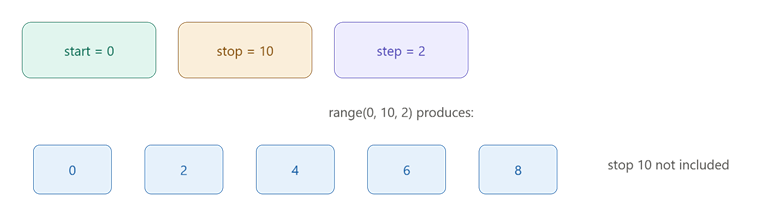
This picture shows how the start, stop, and step values of range() decide which numbers get produced.
The while Loop
A python while loop repeats a block of code as long as a given condition stays true. Unlike a for loop, it does not run a fixed number of times — it keeps checking the condition every round.
Example: Countdown Using while
This example builds a simple countdown timer, showing how a while loop keeps running until its condition becomes false. It highlights the key difference from a for loop — the loop count is not fixed in advance.
count = 5

while count > 0:
    print(count)
    count -= 1

print("Liftoff!")
Explanation:
Python checks count > 0 before every round. It prints the current count, then reduces it by 1 using count -= 1. Once count reaches 0, the condition becomes false, and the loop stops.
Comparison Table: for Loop vs while Loop
| Feature | for Loop | while Loop |
| Best for | Known number of repeats | Unknown number of repeats |
| Stops when | Sequence ends | Condition becomes false |
| Common use | Looping through a list | Waiting for a condition to change |
| Risk | Rare infinite loop | Easy to accidentally create infinite loop |
Nested Loops
A nested loop is a loop placed inside another loop. The inner loop completes all of its rounds for every single round of the outer loop.
Example: Printing a Grid Pattern
This example uses two for loops together to print a small grid of stars, showing how nested loops handle row-and-column style problems. It builds directly on the basic for loop shown earlier in this guide.
for row in range(3):
    for col in range(4):
        print("*", end=" ")
    print()
Explanation:
The outer loop runs 3 times, once for each row. For every single outer round, the inner loop runs completely, printing 4 stars before moving to a new line, creating a 3-row, 4-column grid.
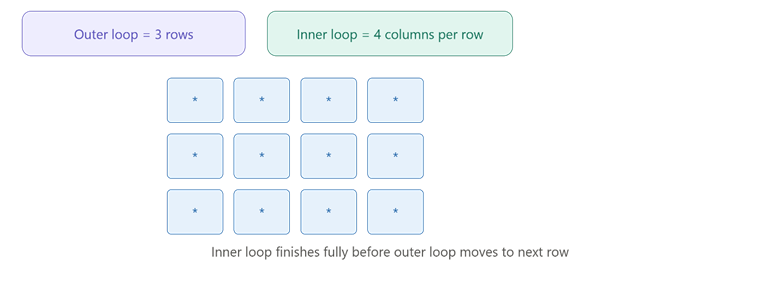
This picture shows how the inner loop completes an entire row before the outer loop moves to the next row.
The Loop else Clause
Python loops support an else block, which runs only if the loop finishes completely without being stopped early by a break statement. This is a feature unique to Python and does not exist in most other languages.
Example: Searching for a Number Without break
This example searches for a number inside a list, using the loop else clause to confirm the search finished normally. It shows a real use case where else on a loop actually adds value.
numbers = [4, 8, 15, 16, 23]
target = 20

for num in numbers:
    if num == target:
        print("Found it!")
        break
else:
    print("Number not found in the list")
Explanation:
Since target (20) is never found in numbers, the break statement never runs. Because the loop completes fully without a break, the else block runs and prints "Number not found."
Comparison Table: break vs Loop else Behavior
| Situation | break Triggered? | else Block Runs? |
| Item found, loop stopped early | Yes | No |
| Item not found, loop finishes fully | No | Yes |
Conclusion
Python for loop and python while loop both repeat code, but a for loop suits a known number of repeats while a while loop suits a condition-based repeat. range() controls exactly which numbers a for loop produces, nested loops handle row-and-column style problems, and the loop else clause confirms whether a loop finished normally or was stopped early with break. The key takeaway is that choosing the right loop type, and understanding how else behaves with break, helps you write cleaner and more predictable Python code.