

Python break continue pass are three loop control statements that change how a loop behaves during its execution. Each one controls the loop in a different way — stopping it, skipping part of it, or doing nothing at all. In this guide, you will learn what each statement does, when to use it, and how they differ from each other.
What are Loop Control Statements?
Loop control statements are special keywords used inside loops to change their normal flow. Instead of always running every line for every round, these statements let you stop the loop early, skip a round, or hold a placeholder spot in the code.
Example: A Loop With No Control Statement
This example shows a plain loop with no control statements, so you can clearly compare how break, continue, and pass change this same basic behavior. It sets the baseline before each keyword is introduced.
for num in range(1, 6):
    print(num)
Explanation:
This loop runs fully from 1 to 5 with no interruption. Every line runs, and nothing is skipped or stopped early — this is the normal loop behavior that break, continue, and pass are each going to change in their own way.
The break Statement
break immediately stops the loop completely, even if there were more rounds left to run. Once break runs, Python exits the loop right away and moves to the code after it.
Example: Stopping at the First Match
This example searches through a list of numbers and stops the loop the moment it finds the target. It shows the most common real use of break — ending a search early once the answer is found.
numbers = [4, 9, 15, 22, 30]

for num in numbers:
    if num == 15:
        print("Found 15, stopping the loop")
        break
    print("Checking:", num)
Explanation:
The loop checks each number one at a time. As soon as it finds 15, the break statement runs, which stops the loop completely — the numbers 22 and 30 are never checked, even though they were still in the list.
The continue Statement
continue skips the rest of the current round only, and moves straight to the next round of the loop. Unlike break, it does not stop the whole loop — the loop keeps going.
Example: Skipping Negative Numbers
This example goes through a list of numbers and skips any negative ones, without stopping the loop. It shows how continue is used to ignore certain items while still processing the rest.
numbers = [5, -3, 8, -1, 12]

for num in numbers:
    if num < 0:
        continue
    print("Processing:", num)
Explanation:
When num is negative, continue skips the print() line for that round only, and the loop moves on to the next number. The loop still checks every number in the list — it just skips the print step for the negative ones.
The pass Statement
pass does nothing at all — it is just a placeholder. It is used when Python requires a line of code to be present, like inside an empty if block or an unfinished function, but you don't want anything to actually happen yet.
Example: Placeholder for Unfinished Code
This example shows pass being used to leave a block empty on purpose, without causing an error. It shows the real reason pass exists — Python does not allow a completely empty block of code.
for num in range(5):
    if num == 3:
        pass  # nothing happens here yet, code to be added later
    else:
        print(num)
Explanation:
When num equals 3, Python enters the if block, but pass tells it to do nothing and move on. Without pass, this empty block would cause a Python error, since an if block cannot be left completely blank.
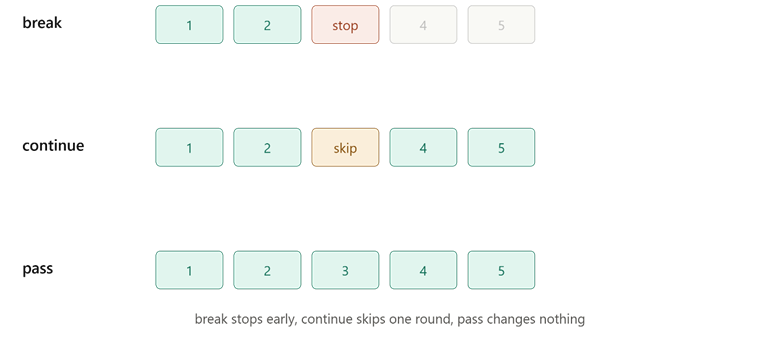
This picture shows the exact difference in loop rounds — break stops early, continue skips one round, and pass changes nothing.
Comparison Table: break vs continue vs pass
| Statement | What It Does | Loop Continues? | Common Use Case |
| break | Stops the loop completely | No | Stop searching once found |
| continue | Skips the rest of the current round | Yes | Skip unwanted items, keep looping |
| pass | Does nothing, just a placeholder | Yes, unaffected | Leave a block empty for now |
Conclusion
Python break continue pass each control a loop in a distinct way — break stops the loop entirely, continue skips just the current round and moves on, and pass does nothing but keeps the code valid where a block is left empty. Knowing when to use each one helps you write loops that behave exactly as intended, whether you're searching for a match, filtering out data, or leaving room for code you'll write later. The key takeaway is that these three keywords give you fine control over a loop's flow, without needing extra if conditions to fake the same behavior.