

A python list is a built-in data type that stores multiple values together in a single, ordered, and changeable collection. Lists are one of the most used data structures in Python. In this guide, you will learn how to create lists, use indexing and slicing, apply common list methods, and work with nested lists.
What is a List in Python?
A list stores multiple items in a single variable, keeping them in a specific order. Unlike some other data types, a list can be changed after it is created — you can add, remove, or update items freely.
Example: Creating a Basic List
This example creates a simple list of fruit names and prints it, showing the most basic way a python list is written and stored. It sets the foundation before exploring indexing, slicing, and list methods.
fruits = ["apple", "banana", "cherry"]
print(fruits)
print(type(fruits))
Explanation:
Square brackets [] create a list, with each item separated by a comma. The type() function confirms that fruits is a list, which can hold text, numbers, or a mix of different data types.
Indexing and Slicing a List
Indexing lets you access a single item in a list using its position number, called an index, which starts at 0. Slicing(Bold) lets you pull out a smaller section of the list at once, using a start and stop position.
Example: Accessing and Slicing List Items
This example shows how to grab a single fruit by its position, and how to grab a range of fruits at once using slicing. It shows both indexing and slicing side by side, since they are closely related but work differently.
fruits = ["apple", "banana", "cherry", "mango", "grape"]

print(fruits[0])       # first item
print(fruits[-1])      # last item
print(fruits[1:4])     # slice from index 1 to 3
print(fruits[:3])      # slice from start to index 2
Explanation:
fruits[0] gets the first item, and fruits[-1] uses a negative index to get the last item without knowing the list's length. fruits[1:4] returns items from index 1 up to, but not including, index 4, and fruits[:3] starts from the beginning automatically.
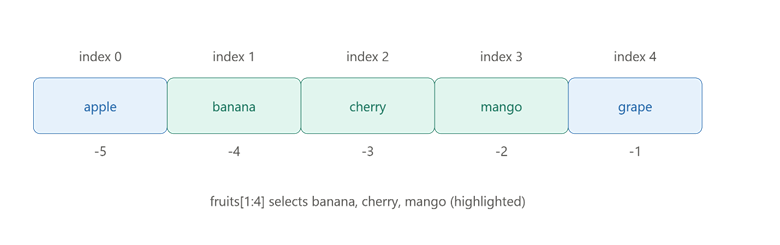
This picture shows how positive and negative index positions work, and which items a slice actually selects.
Common List Methods
Python lists come with built-in methods — functions that let you add, remove, or reorganize items directly. These methods change the list itself, rather than creating a new one.
Example: Using append, remove, and sort
This example uses three of the most common list methods together on a shopping list, showing how items can be added, removed, and reordered. It reflects a realistic, everyday way lists are actually managed in code.
shopping_list = ["milk", "bread", "eggs"]

shopping_list.append("butter")     # add an item at the end
shopping_list.remove("bread")      # remove a specific item
shopping_list.sort()               # sort alphabetically

print(shopping_list)
Explanation:
.append("butter") adds a new item to the end of the list. .remove("bread") finds and deletes "bread" from the list. .sort() then rearranges the remaining items alphabetically, changing the list's order permanently.
Comparison Table: Common List Methods
| Method | What It Does | Example |
|---|---|---|
| .append(x) | Adds one item to the end | list.append("item") |
| .remove(x) | Removes the first matching item | list.remove("item") |
| .insert(i, x) | Adds an item at a specific position | list.insert(1, "item") |
| .pop() | Removes and returns the last item | list.pop() |
| .sort() | Sorts the list in place | list.sort() |
| .reverse() | Reverses the order of items | list.reverse() |
| .index(x) | Finds the position of an item | list.index("item") |
Nested Lists
A nested list is a list that contains other lists as its items, instead of just plain values. This is useful for representing grid-like or grouped data, such as rows in a table.
Example: Storing Student Records with Nested Lists
This example stores each student's name and marks as a small list inside a bigger list, showing a common real use of nested lists. It shows how to access data at two levels deep — the outer list, then the inner list.
students = [
    ["Ravi", 85],
    ["Anya", 92],
    ["Kabir", 78]
]

print(students[0])         # first student's full record
print(students[0][0])      # first student's name
print(students[1][1])      # second student's marks
Explanation:
students[0] gets the entire first inner list, ["Ravi", 85]. Adding a second index, like students[0][0], goes one level deeper to get just "Ravi" from that inner list, and students[1][1] gets 92, the marks of the second student.
Conclusion
A python list is a flexible, ordered collection that can be created with square brackets, accessed through indexing and slicing, and modified using built-in methods like .append(), .remove(), and .sort(). Nested lists extend this further by letting you store lists inside lists, which is useful for grouped or table-like data. The key takeaway is that mastering indexing, slicing, and core list methods gives you the foundation needed for almost every other data structure in Python.