

Python operators are symbols used to perform actions on values and variables, such as adding numbers or comparing two values. Python groups these symbols into different categories based on what they do.
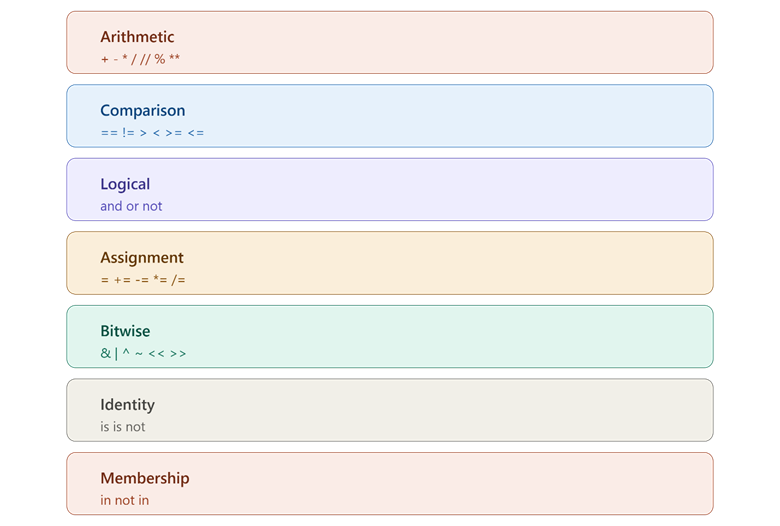
In this guide, you will learn arithmetic, comparison, logical, assignment, bitwise, identity, and membership operators, along with operator precedence.
What are Operators in Python?
Operators are the basic building blocks that let Python programs perform actions on data. Every operator works between two or more values, called operands, and produces a result.
Example: Basic Operator Use
This example shows the simplest possible use of an operator, joining two operands with one symbol. It sets up the idea that an operator always sits between values and produces a new result.
length = 12
width = 4
area = length * width
print(area)
Explanation:
Here, * is the operator, and length and width are the operands. Python multiplies the two values and stores the new result inside area.
Arithmetic Operators
Arithmetic operators perform basic math actions on numbers, such as addition, subtraction, multiplication, and division. Python also includes special math operators for floor division, remainder, and powers that beginners often overlook.
| Operator | Meaning | Example | Result |
| + | Addition | 7 + 2 | 9 |
| - | Subtraction | 7 - 2 | 5 |
| * | Multiplication | 7 * 2 | 14 |
| / | Division | 7 / 2 | 3.5 |
| // | Floor division | 7 // 2 | 3 |
| % | Modulus (remainder) | 7 % 2 | 1 |
| ** | Exponent (power) | 7 ** 2 | 49 |
Example: Splitting Items Evenly
This example shows floor division and modulus together, solving a real problem of splitting items into equal groups with some left over. It shows why these two operators are often used side by side.
candies = 17
friends = 5
each_gets = candies // friends
left_over = candies % friends
print("Each friend gets:", each_gets)
print("Candies left over:", left_over)
Explanation:
// divides 17 by 5 and drops the decimal part, giving 3 full candies per friend. % finds the remainder of that same division, which is 2 candies left over that cannot be split evenly.
Comparison Operators
Comparison operators compare two values and always return either True or False. These are used constantly inside conditions to make decisions in code.
| Operator | Meaning | Example | Result |
| == | Equal to | 4 == 4 | True |
| != | Not equal to | 4 != 5 | True |
| > | Greater than | 4 > 5 | False |
| < | Less than | 4 < 5 | True |
| >= | Greater than or equal | 4 >= 4 | True |
| <= | Less than or equal | 4 <= 3 | False |
Example: Checking Exam Pass Marks
This example uses a comparison operator to check if a student's score meets a passing requirement. It shows how comparisons are usually the first step before a decision is made.
marks = 42
pass_marks = 40
passed = marks >= pass_marks
print("Passed the exam:", passed)
Explanation:
The >= operator checks whether marks is greater than or equal to pass_marks. Since 42 is greater than 40, the result stored in passed is True.
Logical Operators
Logical operators combine two or more True/False conditions into a single result. Python has three logical operators: and, or, and not.
Example: Loan Approval Check
This example combines two separate conditions using and, showing how a real approval decision often depends on more than one requirement being true at the same time.
income = 45000
credit_score = 720

income_ok = income >= 30000
credit_ok = credit_score >= 700

loan_approved = income_ok and credit_ok
print("Loan approved:", loan_approved)
Explanation:
and only gives True when both income_ok and credit_ok are True. Since both conditions are met here, loan_approved becomes True.
Assignment Operators
Assignment operators store a value inside a variable, and can also update that value using a shorter form instead of writing the full expression again.
| Operator | Meaning | Example | Same As |
| = | Assign value | x = 5 | — |
| += | Add and assign | x += 3 | x = x + 3 |
| -= | Subtract and assign | x -= 3 | x = x - 3 |
| *= | Multiply and assign | x *= 3 | x = x * 3 |
| /= | Divide and assign | x /= 3 | x = x / 3 |
Example: Tracking a Shopping Cart Total
This example uses += to build up a running total, a pattern used often in real programs like shopping carts or score trackers. It shows how assignment operators shorten repeated updates to the same variable.
cart_total = 0
cart_total += 250   # add a shirt
cart_total += 999   # add shoes
cart_total -= 50     # apply a discount
print("Final total:", cart_total)
Explanation:
Each += line adds a new item's price to cart_total without retyping the full addition. The -= line then subtracts a discount from the running total, updating the same variable each time.
Bitwise Operators
Bitwise operators work directly on the binary (0 and 1) form of numbers, instead of their normal decimal value. These are less common for beginners but appear in tasks like permission systems and low-level programming.
| Operator | Meaning | Example |
| & | Bitwise AND | 6 & 3 |
| | | Bitwise OR | 6 | 3 |
| ^ | Bitwise XOR | 6 ^ 3 |
| ~ | Bitwise NOT | ~6 |
| << | Left shift | 6 << 1 |
| >> | Right shift | 6 >> 1 |
Example: Combining Permission Flags
This example shows a common real use of bitwise operators — combining separate permission flags into a single number. It demonstrates why bitwise operators matter beyond just plain math.
READ = 4    # binary 100
WRITE = 2   # binary 010

permissions = READ | WRITE
print("Combined permissions:", permissions)
print("Has read access:", (permissions & READ) == READ)
Explanation:
| combines READ and WRITE into one number that represents both permissions together. & then checks if the READ bit is present inside permissions, confirming read access is included.
Identity Operators (is)
Identity operators check whether two variables point to the exact same object in memory, not just whether their values look the same.
Example: Comparing Two Separate Lists
This example compares two lists that hold identical values but exist as separate objects in memory. It shows the key difference between checking equal values and checking the same object.
cart_a = ["pen", "book"]
cart_b = ["pen", "book"]
cart_c = cart_a

print(cart_a == cart_b)   # same values
print(cart_a is cart_b)   # different objects
print(cart_a is cart_c)   # same object
Explanation:
== returns True because cart_a and cart_b hold the same values. is returns False for cart_a and cart_b because they are two separate objects in memory, but True for cart_a and cart_c, since cart_c points to the exact same object as cart_a.
Membership Operators (in)
Membership operators check whether a value exists inside a sequence, such as a list, string, or dictionary.
Example: Checking Allowed Usernames (H3)
This example checks if a username exists inside a list of blocked names before allowing account creation. It shows a practical, real-world use of membership checking.
blocked_names = ["admin", "root", "test"]
new_username = "admin"

if new_username in blocked_names:
    print("Username not allowed")
else:
    print("Username available")
Explanation:
in checks whether new_username exists inside the blocked_names list. Since "admin" is found in the list, the condition is True, and the program blocks that username.
Operator Precedence
Operator precedence is the fixed order Python follows when a single line contains more than one operator, similar to the order of operations in math. Operators with higher precedence are solved first.
A simplified order, from highest to lowest:
- ** (exponent)
- *, /, //, %
- +, -
- Comparison operators (==, >, <, etc.)
- not
- and
- or

This picture shows the order Python follows when solving mixed operators, from highest priority at top to lowest at bottom.
Example: Precedence Changing a Bill Calculation
This example shows how skipping brackets can silently produce the wrong bill amount, because Python solves multiplication before addition. It highlights why understanding precedence matters in real calculations, not just theory.
item_price = 200
tax_flat = 20
quantity = 3

wrong_total = item_price + tax_flat * quantity
correct_total = (item_price + tax_flat) * quantity

print("Without brackets:", wrong_total)
print("With brackets:", correct_total)
Explanation:
In wrong_total, Python solves tax_flat * quantity first because * has higher precedence than +, giving an incorrect bill. In correct_total, the brackets force item_price + tax_flat to run first, giving the intended result.
Comparison Table: Types of Python Operators
| Operator Type | Symbols | Purpose |
| Arithmetic | + - * / // % ** | Perform math |
| Comparison | == != > < >= <= | Compare two values |
| Logical | and or not | Combine true/false conditions |
| Assignment | = += -= *= /= | Store and update values |
| Bitwise | & | ^ ~ << >> | Work on binary bits |
| Identity | is, is not | Check if same object in memory |
| Membership | in, not in | Check if a value exists in a collection |
Conclusion
Python operators cover seven main types — arithmetic, comparison, logical, assignment, bitwise, identity, and membership — each built for a different kind of task. Operator precedence decides the exact order these operators run in when combined in one line, and brackets can be used to force a different, intended order. The key takeaway is that knowing which operator to use, and how Python orders them, prevents subtle bugs like the incorrect bill total shown above.